BETWEEN ALERT AND INTERVENTION THERE IS OFTEN AN OPERATIONAL GAP.
Your systems report problems but do not act on them. Vaiking closes this gap with defined, approved actions before manual action is needed.
Prerequisite: running Vaiking Monitoring. The Automation Module requires a validated data stream. Monitoring must be stable before automation makes sense.
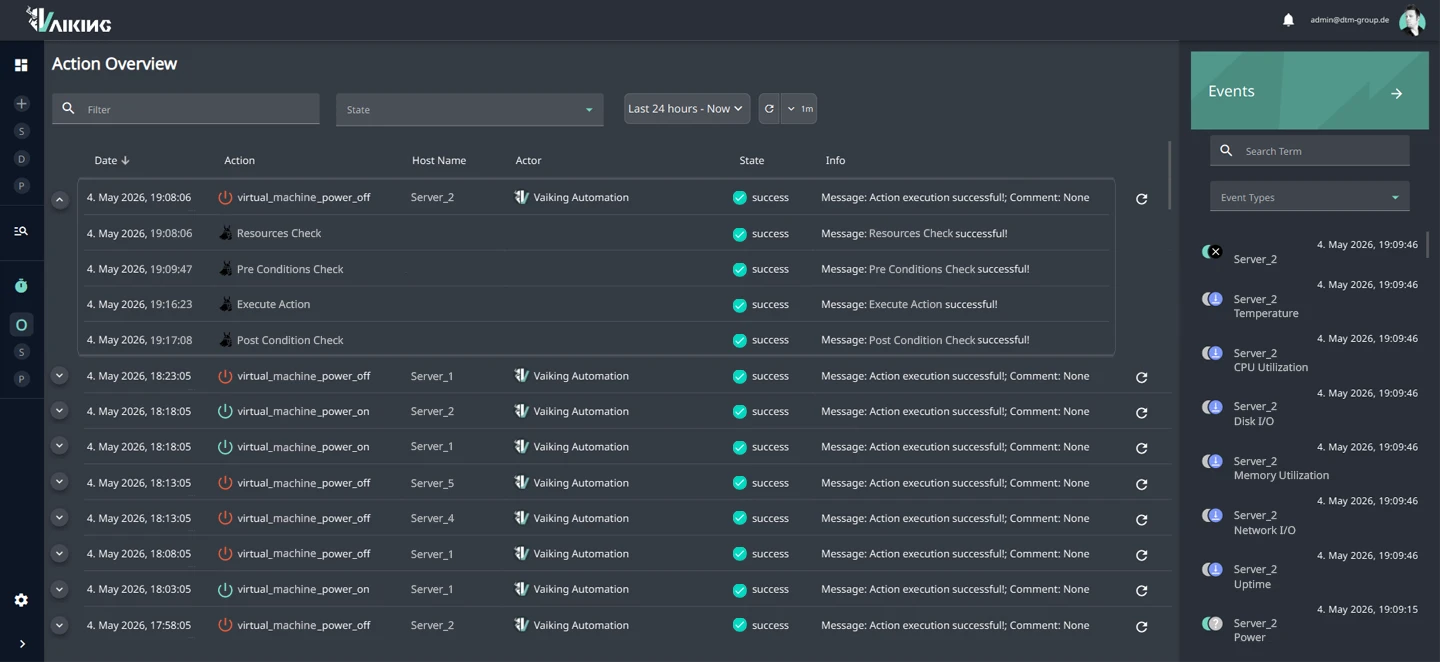
INTERVENTIONS HAPPEN. BUT NOBODY CAN VERIFY WHETHER THEY WORKED.
An action runs at 03:00. The system reports: executed. But did it resolve the problem? Is the state now stable? Or is the same root cause still running, generating the next escalation in an hour?
Automation without outcome verification remains operationally incomplete. And in critical infrastructure, "executed" is not a sufficient answer.
SLA PROTECTED. RELEVANT ESCALATIONS ONLY. EVERY INTERVENTION TRACEABLE.
SLA protection without manual monitoring
Interventions are executed and confirmed before the next threshold is breached. No manual check to see whether the action worked.
On-call as fallback, not as default
On-call is only escalated when an automated measure has not reached the target state. Not after every automated execution.
Every intervention traceable
When the intervention occurred, with what PRE status, what outcome, whether fallback was triggered: fully logged without manual documentation.
EVERY INTERVENTION WITH A MEASURABLE OUTCOME. OR IMMEDIATE ESCALATION.
Other systems execute and go silent. Vaiking measures the state afterwards and responds when the outcome deviates from the target.¹
PRE: Check preconditions Before Vaiking acts, two parallel checks run. Pre-conditions check states: is the target reachable? No active maintenance window? No parallel intervention on the same segment? Resource pools check capacity: is the configured budget for power, parallel actions or other defined resources still available? If either check fails, the action does not start. The system escalates instead.
EXEC: Execute action Service restart, reboot, VM migration, configuration change, etc. The action runs via protocols such as REST API, SSH or SNMP on the target system.
POST: Measure state After the action, Vaiking measures the actual state against the configured target: service availability, temperature or replication status. If the target is not reached, the system executes the configured follow-up actions or escalates directly. No intervention goes without feedback.
Fallback & compensation If the POST check fails, the system responds immediately: configured follow-up action or escalation to on-call. Which response applies is defined per action. In no case does a failed intervention go unregistered.
Control layer In addition to PRE/POST logic, a control layer protects against uncontrolled execution: cooldowns prevent flapping, downtime checks block actions during maintenance windows, resource pools limit parallel interventions.
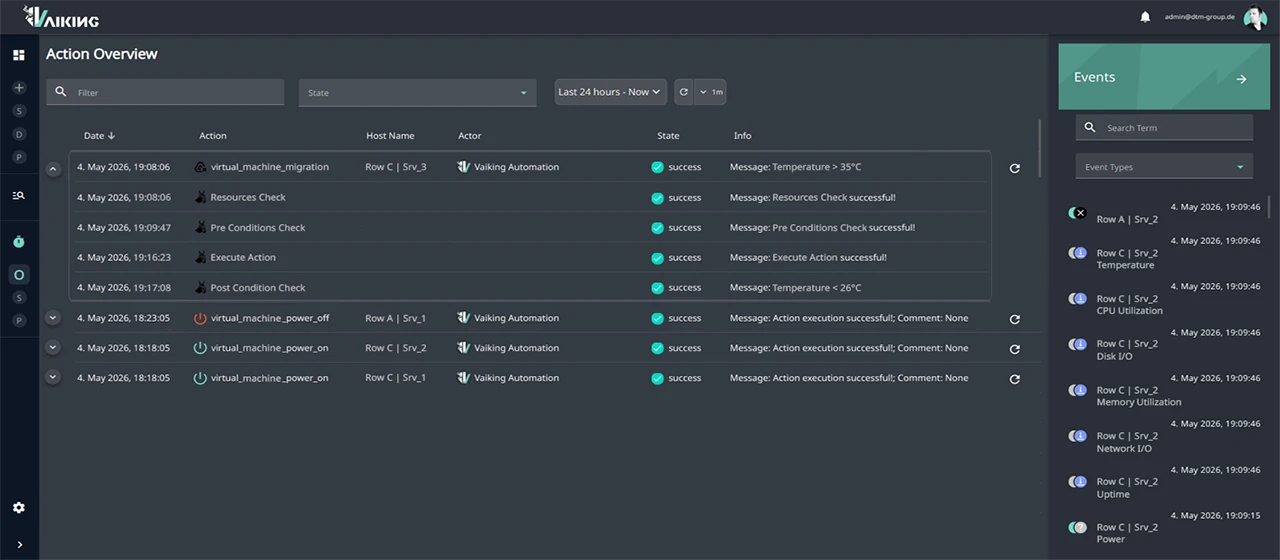
Trigger sources
Scheduled, state changes, threshold breaches, aggregated values, AI results and manual triggering. Six trigger types, combinable without custom code.
Action types
Vaiking accesses target systems via protocols such as REST API, SSH and SNMP. The required credentials are stored encrypted in the central credential store and retrieved at runtime. No plaintext in configuration files. Typical actions: service restart, reboot, interface configuration after patch execution, configuration change. Actions can be applied individually or in batch across multiple target systems. All actions run through the PRE/POST validation logic.
¹ Pre-/Post-Condition Checks on automated actions: protected by registered utility model.
CAN I TAKE RESPONSIBILITY IF SOMETHING GOES WRONG?
Incorrect actions can be reversed
If the POST check fails, the system executes the configured follow-up actions without operational interruption. Which response applies is defined per action. No failed intervention goes unregistered.
Fully documented
Every action is logged completely: PRE conditions with individual result, execution timestamp, POST measurement and, where applicable, the triggered follow-up action or escalation.
No intervention without a validated data stream
Triggers, validation logic and actions access the same data stream as Monitoring. No latency between detection and response, no synchronisation issues.
Credentials managed centrally, not exposed
Vaiking executes actions via protocols such as SSH, SNMP and REST API. This requires access to your systems. Credentials are stored centrally in the system in encrypted form and retrieved at runtime. No plaintext in configuration files, no shared password store.
THERMAL ANOMALY: NO MANUAL INTERVENTION, NO SLA BREACH
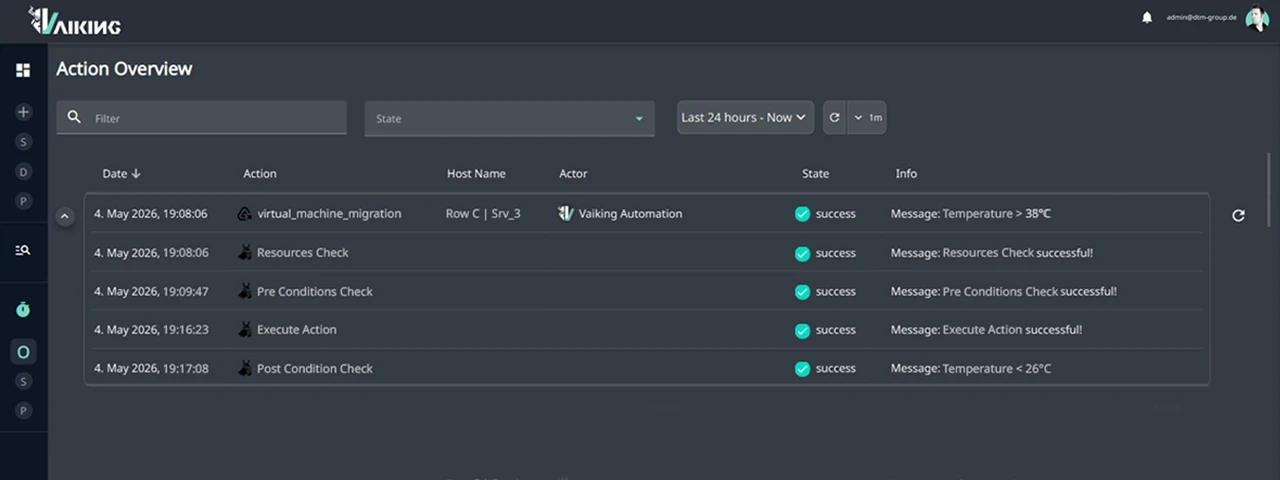
Server row C, 38°C. Vaiking detects the temperature rise.
PRE: Capacity on neighbouring hosts checked. No active maintenance window. Resource budget available. Preconditions met.
EXEC: VM migration to less utilised hosts executed. Timestamp: 03:12.
POST: Temperature in server row C after a few minutes at 26°C. Target state reached.
SLA unaffected. Fully logged. No on-call alert.
AUTOMATION BEGINS AFTER VALIDATED MONITORING
Automation requires stable, validated monitoring. That is the prerequisite for reliable interventions.
The first entry point is processes that were previously manual but well documented: recurring restarts, known escalation chains, planned maintenance tasks. Quick wins first. These are not parallel projects. They are the next step after stable monitoring.
The Automation Module requires the Vaiking Monitoring data stream. Starting with Monitoring lays the foundation. The call assesses whether your current setup is ready for the next step.
INCREMENTAL ACTIVATION. EVERY ACTION APPROVED. EXISTING PROCESSES REMAIN.
Approval per action, not per category
No blanket automation rules. Every action is configured individually and approved separately. What is not explicitly enabled is not executed.
Analysis mode as starting point
Vaiking starts in analysis mode: read data, correlate, raise alerts. Automated interventions are only activated when you configure and approve them. Incremental expansion, no system change.
Existing ITSM processes remain primary
Ticketing systems, ITSM platforms and escalation paths are not replaced. The Automation Module supplements the data stream and can raise tickets. Existing processes continue.
Exit without rebuilding existing systems
Adoption and cancellation of the Automation Module are possible without data loss or system changes. Monitoring runs independently of it.
YOU KNOW WHAT THE SYSTEM CAN DO. NOW WE ASSESS WHAT IT DELIVERS FOR YOUR OPERATIONS.
We check which manual interventions in your setup can be reliably automated using rule-based logic.